
বাংলা: এই পাতাটি বাংলায় পড়ুন
Madrasa Software Features: What Sabaq Does, Module by Module
These are the madrasa software features you get with every Sabaq plan: admission, teacher and salary management, attendance with ZKTeco biometric devices, fees and chanda (regular community contribution) collection, accounts, exams and results, hifz (Quran memorisation) tracking, SMS, ID card and certificate printing, a parent and teacher Android app, reports, and user roles with shift and branch support. Newer modules add daily lesson evaluation, online payment, boarding, HR and payroll, and multi branch. All of it runs on your own subdomain, in Bangla, English or Arabic, and none of it is charged for separately. Each group below links to a more detailed page.
| What it is | The module by module feature list of Sabaq madrasa management software, from admission to accounts, boarding and payroll. |
|---|---|
| Who it is for | A madrasa comparing what is included before buying, and an existing user checking what a module covers. |
| Languages | The interface runs in Bangla, English and Arabic. Support is given in Bangla. |
| Where it runs | Runs in a web browser on any device. The companion app is Android only, through the Play Store. |
| Price | 500 BDT per month, 5,000 BDT per year or 20,000 BDT one time, per madrasa. Installation is 2,000 BDT under 200 students and 5,000 BDT above that. |
| In use by | 728 institutions in 62 districts of Bangladesh. |
Prices and figures on this page were checked on 10 September 2026.
Which madrasa software features matter most?
In our experience the three that decide whether a madrasa keeps using a system are fee collection with receipts and dues, attendance that parents can see, and exam results that print without retyping. Everything else builds on those. The table gives a one line summary of each group and who in the madrasa uses it; the sections after it go into more detail.
| Feature group | Mainly used by | Details in Bangla |
|---|---|---|
| Admission and student profiles | Office | On this page |
| Teacher management and salary | Office, principal | On this page |
| Attendance and biometric devices | Teachers, office | Attendance page |
| Fees, chanda and donations | Accountant | Fees page |
| Accounts (income and expense) | Accountant, committee | Accounts page |
| Exams, results, marksheets | Teachers, office | Exams page |
| Hifz tracking | Hifz teachers, parents | Hifz page |
| SMS | Office | SMS page |
| ID cards, certificates, print designs | Office | Print page |
| Parent and teacher app | Parents, teachers | App page |
| Reports | Principal, committee | On this page |
| Roles, shifts and branches | Administrator | On this page |
A note on spelling: these features are the same whether you searched for madrasa software features, madrasah management software or madrasha management system. All three spellings are common in Bangladesh and refer to the same product.
Screenshots: web software and mobile app
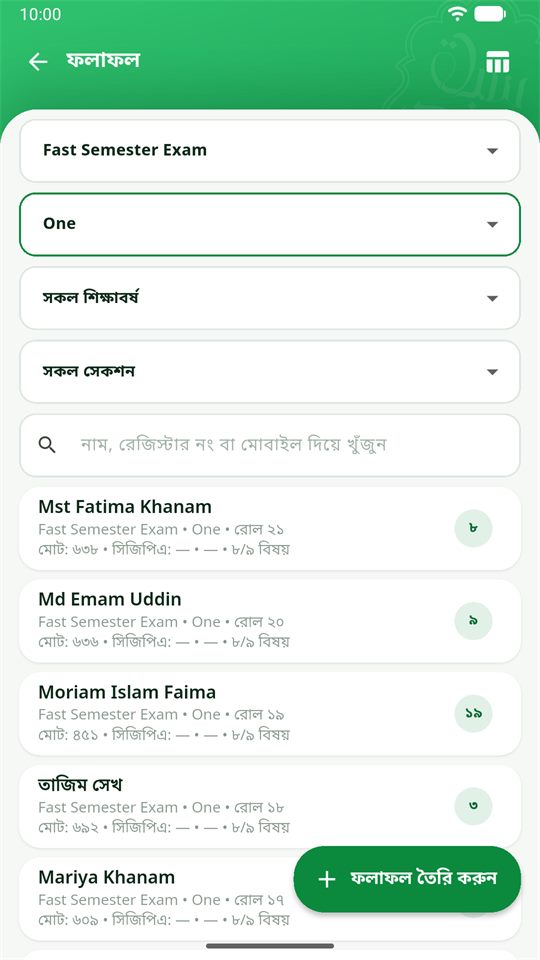
The web software runs the office; the Android app shows everything on a phone and handles daily tasks. Real screens below (personal numbers blurred).
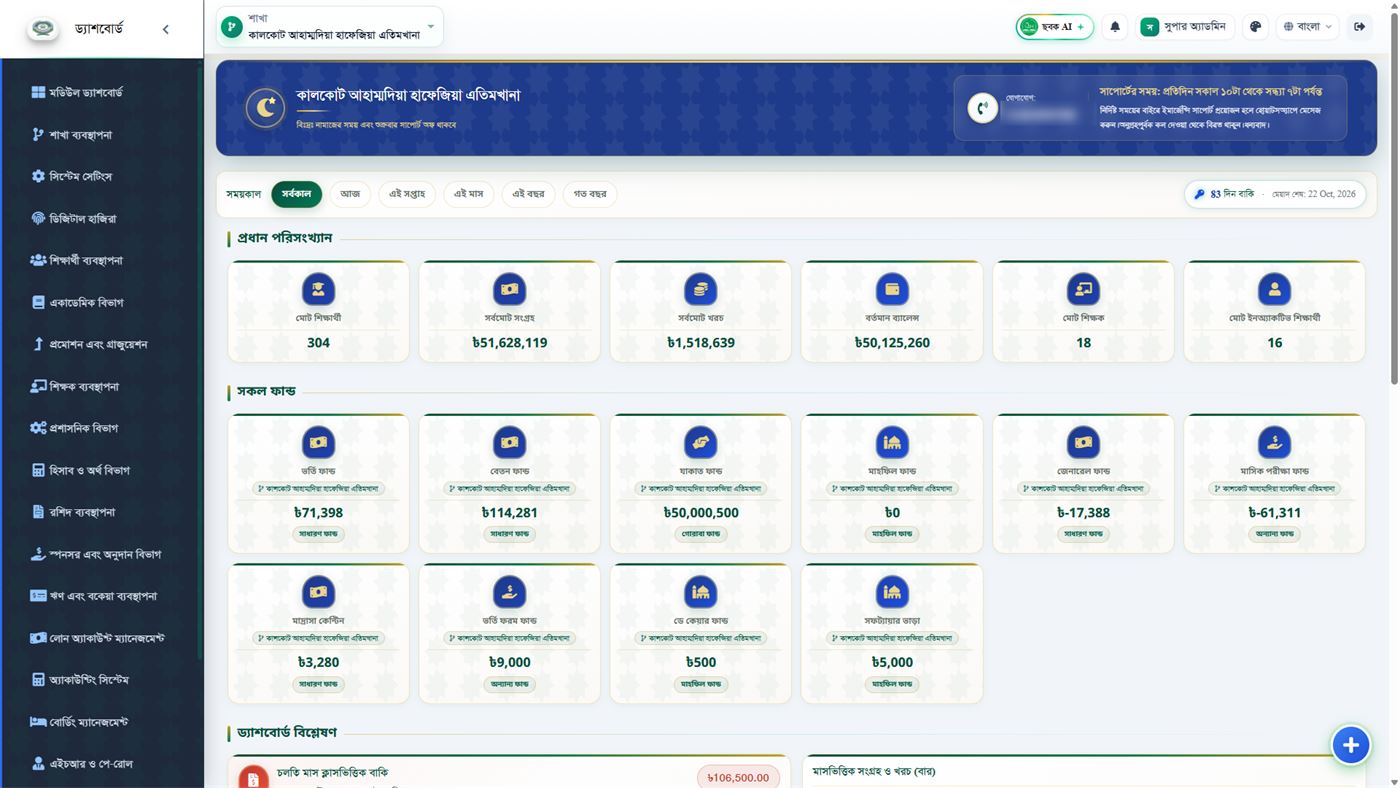
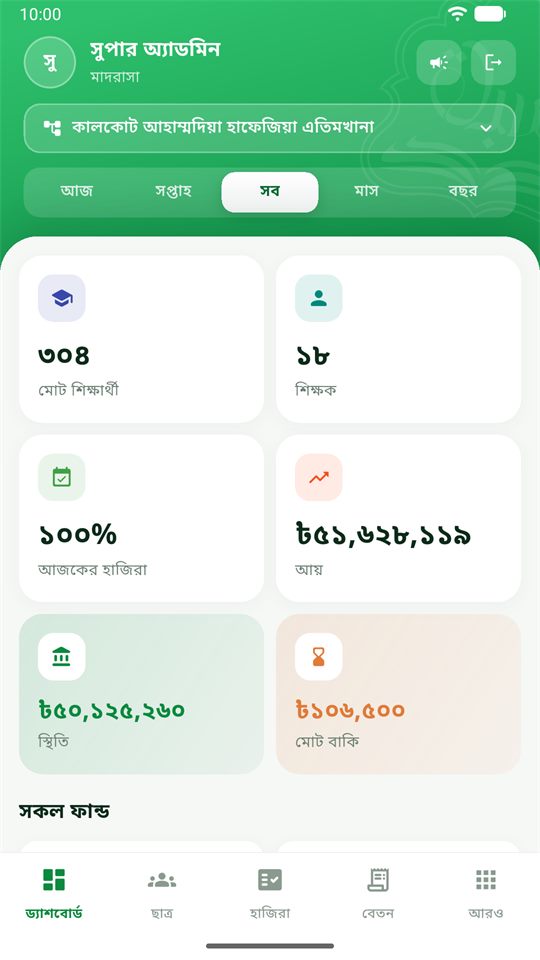
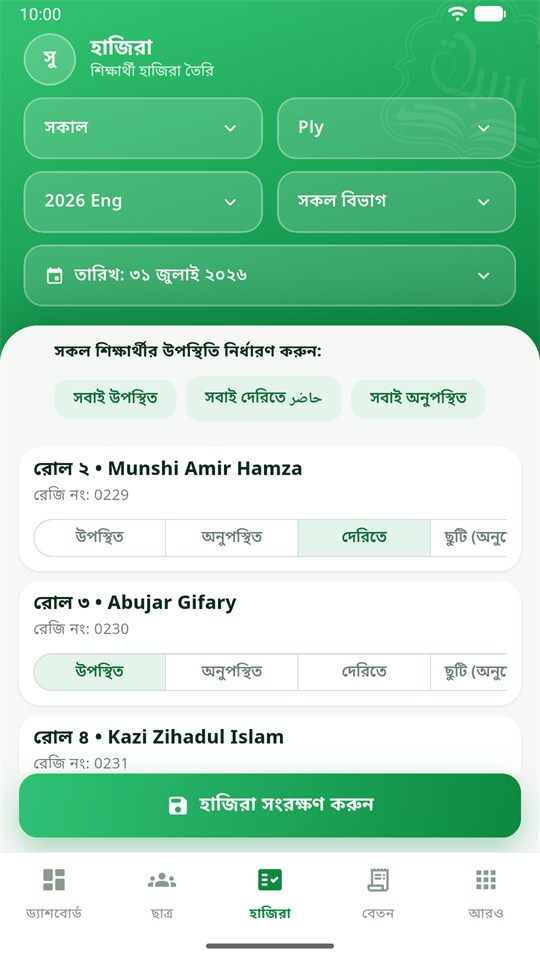
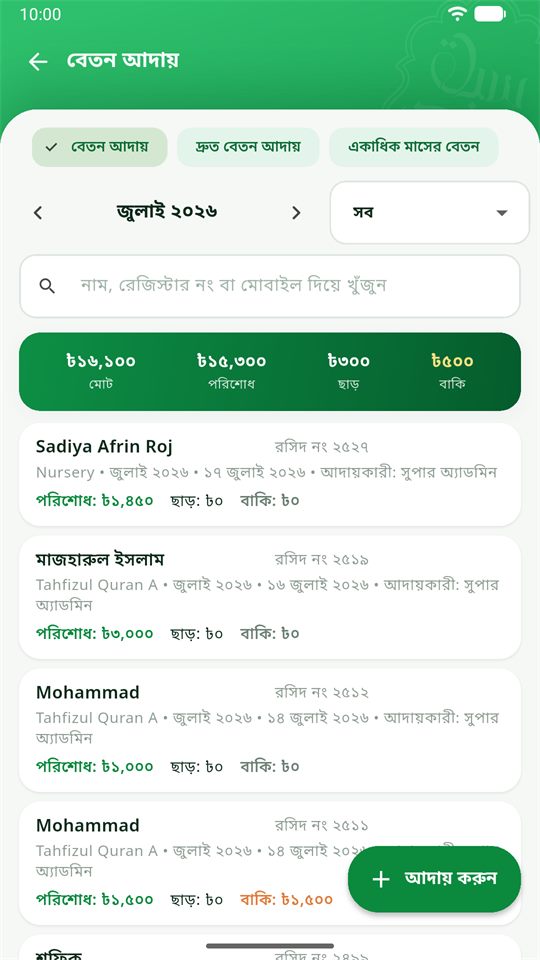
1. Admission and student profiles
Every student gets a profile with photo, guardian name and phone, address, class (jamaat) and section, admission date and fee category. Admission forms can be printed, and profiles are searchable by name, ID or class. Students can be promoted between classes at year end without re-entering their details.
2. Teacher management and salary
Teacher profiles hold subjects, classes and contact details, and the salary module records monthly pay, advances and deductions so that salary appears correctly in the expense side of the accounts.
3. Attendance with ZKTeco biometric devices
Attendance is taken either manually in the web system or app, or automatically from ZKTeco fingerprint and face devices (iClock 9000G, MB360, MB460, MB560, F18, F22, V5L and SenseFace). An absence SMS can go to the guardian the same day. Monthly attendance reports are available per class. Details in Bangla on the attendance page.
4. Fees, chanda and donations
Fee heads are defined by the madrasa (monthly tuition, admission, boarding, exam and so on). Each payment prints a receipt, and the system keeps a live dues list per student and class. Chanda and one time donations are recorded separately from student fees so that donor reports stay clean. Details in Bangla on the fees page.
5. Accounts
Sabaq keeps double entry books, not a single list. There is a chart of accounts, four voucher types (journal, payment, receipt and contra), a general ledger, a day book and a cash book. From those it produces a trial balance, a balance sheet, a profit and loss statement and the madrasa income and expense statement a committee asks for, plus a fixed asset register with depreciation. Named funds each carry an opening balance and a running balance, and money can be transferred between funds with the transfer recorded. Details in Bangla on the accounts page.
6. Exams, results and marksheets
You set up exam terms, subjects and full marks per class, teachers enter marks, and the system produces marksheets, merit lists and class result summaries. Results can be published to parents in the app. Details in Bangla on the exams page.
7. Hifz departments
Hifz classes are kept as their own classes, and teachers mark each student’s daily lesson as good, average, weak or absent. The four marks can be renamed to whatever the madrasa already calls them, and a subject taught from more than one book is counted separately. Parents see the progress in their web panel, and can get the day’s result by SMS or WhatsApp. Our hifz madrasa software page explains this in English; details in Bangla on the hifz tracking page.
8. SMS
SMS packages are used for absence alerts, fee due reminders, result notifications and general notices to guardians and teachers. Details in Bangla on the SMS page.
9. ID cards, certificates and print designs
Ready designs print student ID cards (plain or RFID), admit cards, certificates and receipts with the madrasa’s name and logo. Details in Bangla on the print designs page.
10. Parent and teacher Android app
Parents see attendance, dues, results, hifz progress and notices; teachers mark attendance and enter records from their phone. The app is free on the Play Store. See the English app page or the Bangla parent app page.
11. Reports
Student lists, attendance summaries, fee collection and dues, income and expense, exam results and hifz progress are all available as on screen reports and printouts for the principal and the management committee.
12. Roles, shifts and branches
Separate logins for principal, accountant, teachers and data entry staff, each seeing only what their role needs. Madrasas that run morning and afternoon shifts, or more than one campus, can set up shifts and branches inside one account.
13. Daily lesson evaluation
The newest module, and the one madrasas ask about most. A teacher picks a class, subject, book, month and year, and gets a grid: student names down the left, the days of the month across the top. Tapping a cell marks that day good, average, weak or absent, and tapping again corrects a mistake. Future dates cannot be marked, so nobody fills in the week ahead.
The monthly and yearly totals build themselves and print with signature lines for the class teacher and the head teacher. Guardians see the same figures on their own panel, and the madrasa can switch on a daily message at a set time so a parent knows the same evening. This module runs on the web, not in the app. Full detail on the daily lesson evaluation page.
14. Online payment
A guardian signs in, ticks the months they want to clear and pays on a secure SSLCommerz page by card, mobile banking or internet banking. The receipt appears immediately and is stored as an ordinary fee receipt, which means the dues list, the student ledger and the fund balance all move on their own. The office does not re enter anything. A separate report shows who paid online, and it prints and downloads like any other report.
One thing to plan for: your madrasa opens its own SSLCommerz merchant account and enters the store details in the software once. It is not switched on by simply buying the software. See the online payment page.
15. Boarding management
For residential madrasas: which students board, seat and room records, daily meal entries, the bazar ledger and the monthly boarding bill that joins the student’s normal dues. When the bazar is entered, a photo of the paper memo can be attached, and the software shrinks a large phone photo as it saves so the record opens quickly months later. See the boarding page.
16. HR and payroll
Teacher salary sits in module 2. This one is for everyone else: the guard, the cook, the clerk, the cleaner. Each staff profile carries a staff ID, joining date, designation, phone, monthly salary, photo and signature. Salary is entered month by month, with a deduction and a written reason for it, the net payable calculated after the deduction, paid and due tracked separately, a receipt number, and the fund the money is paid from. An increment list records the old salary, the increase, the new salary, who approved it and why, and loans and dues are kept in their own section. See the HR and payroll page.
17. Multi branch
Several campuses on one login. A switcher at the top moves the entire system to another branch, so students, staff, attendance and accounts all follow. Each branch keeps its own income, expenses and dues, a user can be tied to one branch and see nothing else, and a new branch inherits the class and subject structure instead of being built from scratch. A single campus does not need this; sections cover it. See the multi branch page.
18. Admissions from the website
If the madrasa has a website, guardians can apply from it. Applications land in a pending list with name, parents, date of birth, photo and previous institution. Approve one and the applicant becomes a student, with no retyping.
19. Permissions, per role or per person
Permissions used to follow the role alone. Now there are three ways: by role, by role plus a few extras, or a hand picked set with the role set aside. Which permissions came from the role is marked, so it stays readable a year later. Alongside it, subject assignment decides which teacher takes which subject in which class, and after that a teacher signs in and sees only their own subjects.
20. Backup and the update log
Backups are taken on the server side, and inside the software there is a plain Bangla list of what changed in each version, so the madrasa can see that the thing they are paying for keeps moving. The public version of that list is on the software updates page.
All of it, one price. Sabaq does not charge per module. Everything from 1 to 20 is inside the plan, so nothing on this page is an upsell. If a module is not enabled for your madrasa yet, ask and we switch it on. The only paid extras are things with a real cost behind them: SMS credit, RFID cards, biometric devices and a website.
Three languages
Bangla is the default, and English and Arabic can be switched on, so the madrasa chooses. Bangla is the default because that is what the office works in. English is there when a report has to go outside the institution, and Arabic matters where teaching is done in Arabic.
See the features live
A free demo walks through the modules your madrasa will actually use.